How to Make a Custom Pet Photo Mug
Turn a dog or cat photo into a personal mug gift. Choose a photo, create the design, prepare the file, and order your printed mug.
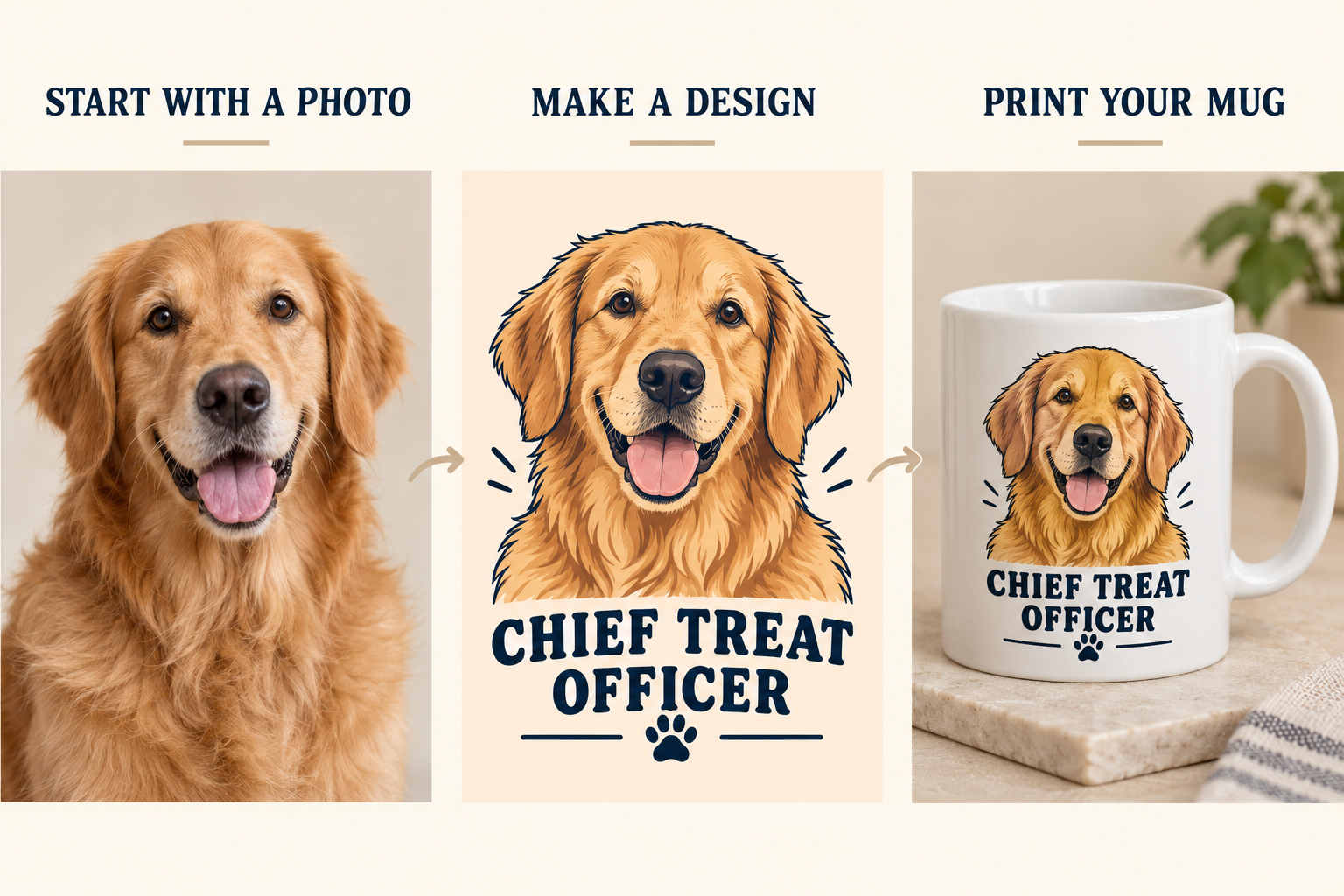
A custom pet mug starts with the animal you know: the dog who waits beside the treat drawer, the cat who takes over your desk, or the puppy who falls asleep halfway through everything. Choose a recognizable photo, build the design around that personality, and upload the finished artwork to a mug printer.
Here is the full route from photo to gift, with design examples and an ordering screenshot.
1. Choose a photo that shows your pet’s face
Start with an original photo from your camera roll. Look for clear eyes, a sharp nose, visible fur markings, and space around the ears. A head-and-shoulders portrait is easy to place on a mug because the face stays prominent at a small size.
Use this quick photo checklist:
- Light: photograph the pet beside a window or outdoors in open shade.
- Focus: tap the eyes on your phone screen before taking the picture.
- Framing: include both ears and leave room around the head.
- Background: choose a simple wall, blanket, or patch of grass.
- Expression: use the look that captures the animal’s personality.
For a black cat, expose the photo so you can see its eyes and fur texture. For a white dog, keep detail in the coat instead of photographing it against a bright window. For two pets, take a photo with both faces at a similar distance from the camera.
2. Pick one idea for the design
Give the mug one main message. A portrait and a short caption are enough to make the gift personal.
| Pet photo | Design idea | Caption example |
|---|---|---|
| Golden retriever waiting for a snack | Friendly portrait with warm colors | Chief Treat Officer |
| Cat sitting on a keyboard | Serious portrait with a clean office theme | My Supervisor |
| Puppy asleep on a blanket | Soft colors and a simple portrait | Nap Department |
| Dog looking ready for a walk | Bold portrait with an outdoor theme | Walk First. Coffee Later. |
| Two pets sitting together | Matching portraits with two names | Milo & Luna |
| Pet portrait for a birthday gift | Portrait with the recipient’s name | Emma’s Favorite Coworker |
The illustrated example below follows the first idea: a golden retriever portrait, a warm peach design, and the caption Chief Treat Officer.
Design example: keep the same recognizable face throughout the artwork and put the caption below it.
3. Create the artwork on your iPhone
Open MugMeme, choose the pet photo, and select a style. Start with Cat Lover for a cat-themed design or choose another style that fits the gift. Browse the MugMeme style gallery to compare the visual directions.
Generate a version, then inspect the face. Check the ear shape, nose, eye color, and distinctive markings. Choose the result where those details stay recognizable.
For the golden retriever example, use a friendly portrait and warm colors. For the supervisor-cat idea, choose a serious expression and a simple composition. These are design directions; select the app style that matches your idea.
Follow the complete iPhone mug design walkthrough for the upload, generation, and download steps.
4. Make the pet the main subject
Keep the portrait large enough to recognize from across a desk. Leave space around the ears, and place the caption where it does not cover the face.
Choose a layout based on the artwork:
- Single portrait: place the face on one side of the mug.
- Portrait on both sides: repeat the same image so it is visible from either side.
- Two pets: give each animal its own area and put the names under the correct portraits.
- Wraparound scene: spread the background around the mug while keeping the face in one clear area.
For a mug with Milo and Luna, use matching portrait sizes and the same typeface for both names. For a mug with one cat, a large portrait and My Supervisor will read more clearly than a collage of six small photos.
5. Preview and download the flat design
Rotate the design in MugMeme’s 3D preview. Inspect both sides and the area next to the handle. Read the caption at the size it will appear on the mug.
Download the finished image. Use the exported artwork for printing, not a screenshot of the 3D mug. The printer needs the flat design so it can place it on its own mug template.
For the file dimensions and export settings, follow our photo mug image preparation guide.
6. Upload your pet design to a mug printer
Open Shutterfly’s Upload Your Own Design Photo Mug, select the size and color, and click Personalize. Use Upload Photos to select your pet artwork.
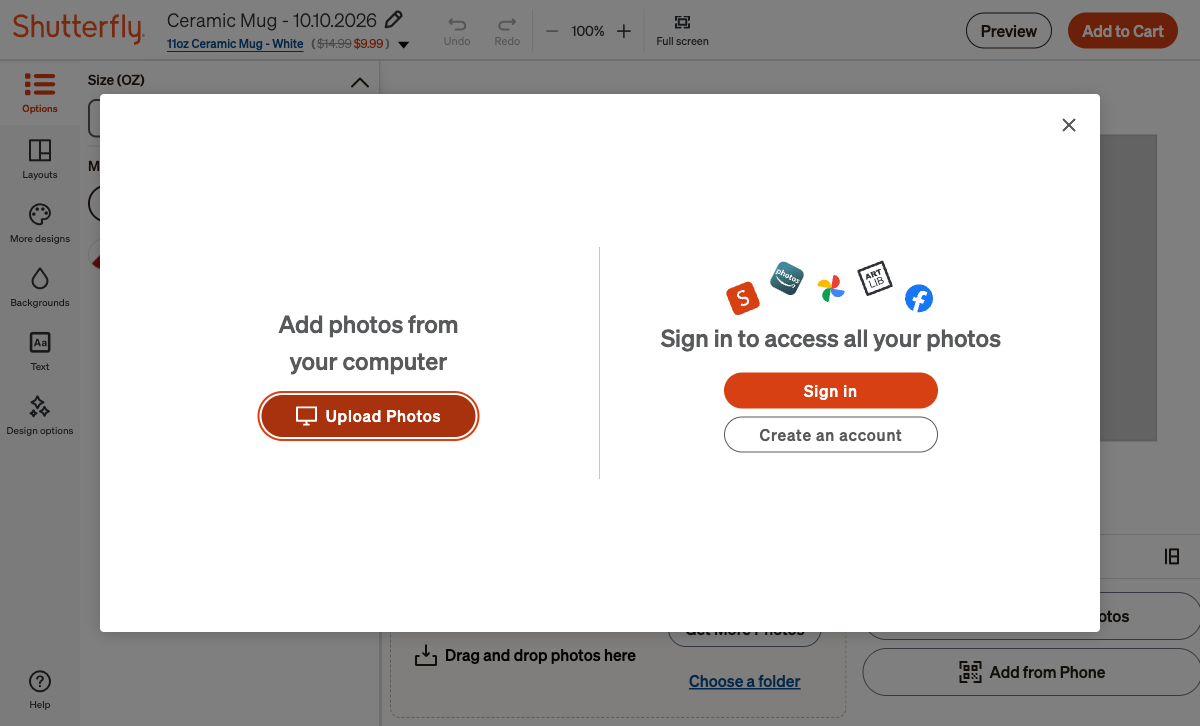
Upload the exported pet design from your device.
Place the image in the editor, remove the unused template text, and open the preview. Check that the ears and caption fit inside the printed area. Then add the mug to the cart, sign in, enter the delivery address, and choose shipping.
Use our Shutterfly ordering guide for the complete sequence with screenshots. For other services, compare the California printing and delivery options.
Three gift examples to make your own
A dog-owner birthday mug
Use a bright portrait of the recipient’s dog. Build the design around the pet’s face and choose a cheerful palette. A caption such as Chief Treat Officer connects the gift to the dog’s everyday routine.
A cat mug for someone who works from home
Choose a photo of the cat looking directly at the camera. Use a clean background and a short office joke such as My Supervisor. Keep the face large and the text on its own line.
A matching pair for a two-pet household
Make one design for each animal using the same colors and layout. Put the right name on each mug. Order the same mug size and finish for both so the pair looks intentional.
Before you order
Check the pet’s face, the spelling of the name, the caption, the mug size, and the delivery address. Remove extra text boxes and make sure the printer shows no low-resolution warning. Save the final artwork so you can order another copy of the same design.
Common questions
Can I use a cat photo as well as a dog photo?
Yes. Start with a sharp portrait and keep the animal’s face visible. The same preparation and ordering steps apply to both.
Can I put two pets on one mug?
Yes. Use a two-photo layout or prepare a flat design with both portraits. Keep their faces at similar sizes and place each name below the correct pet.
Should I upload the photo or the AI design to the printer?
Upload the file you want printed. Use the original photo for a photographic mug, or the exported MugMeme artwork for a stylized mug.
How do I turn the design into a physical gift?
Export the image, upload it to a mug printer, review the preview, and complete the order. The printer supplies the mug and ships it to the address you enter.